Skip to content
SentinelHSE
Job schedule

Work with a due date and no slot is the work that goes late.

A planboard for HSE work — onto lanes, against shifts, on the site’s own clock. And it will not hand today’s jobs to somebody attendance says is not there.

A location is recorded at the moment of a punch, against a site that worker is permitted to clock at. Nothing is recorded between punches — the boundary, in full.
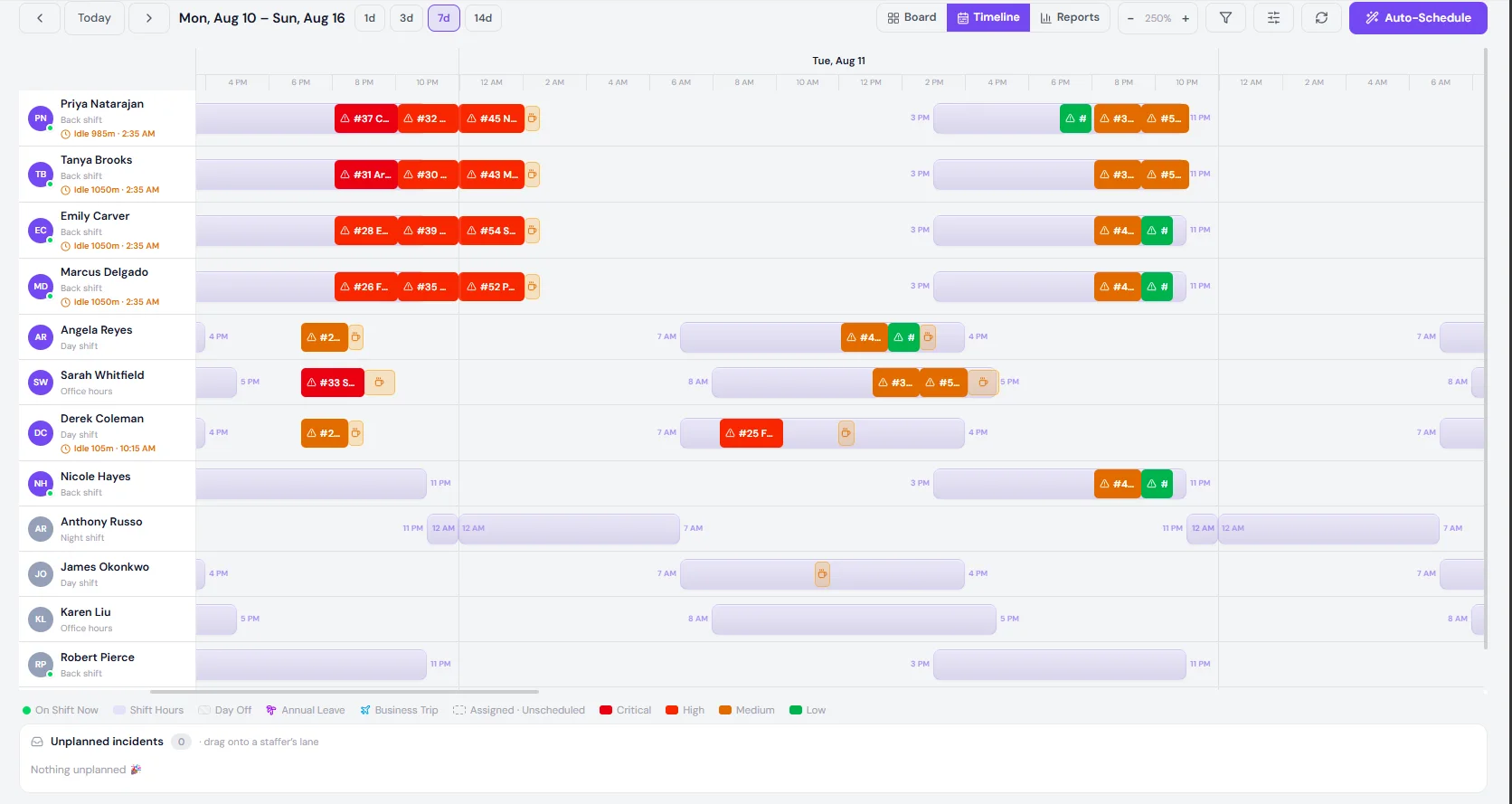
The job schedule timeline: twelve staff lanes against a clock, each with their shift drawn behind their assigned jobs, coloured by severity
Illustrative data — not a customer. Every lane carries that person’s shift; the coloured blocks are jobs placed inside it.

The question a roster never has to answer.

Every corrective action, inspection and investigation on this site already has an owner and a date. None of that says when, and a backlog of owned work with no hours against it is a backlog that gets discovered at the deadline.

And there is a worse version. A job planned onto somebody who is not on site today is not planned — it is a rectangle on a lane, and it will be re-planned in a hurry by whoever notices first, which is usually nobody until it is late.

In an evacuation, the roll call is a list printed this morning. The rest of the week, it is the answer to a quieter question: is the person I just gave this job to actually here?
One plant, one moment

18:49 at the Houston plant. Twelve on the roster, four on site.

The roster is a plan. The site is a fact. Most weeks nobody needs the difference, and the week somebody does, it is the only number that matters.

Four shifts at one plant, showing how many are rostered and how many are on site.
ShiftWindowRosteredOn siteWhat the record says
Day shift07:0016:0030 on sitePunched in between 06:52 and 07:09, out between 16:00 and 16:11. Gone.
Office hours08:0017:0020 on siteOut at 17:01 and 17:06. Gone.
Back shift15:0023:0064 on siteOne arrived at 15:24 and is flagged late against a ten-minute grace. One checked out at 17:40. One never checked in and was marked absent by the sweep.
Night shift23:0007:0010 on siteTheir shift has not started, so they have no record yet — and that is correct, not missing.

Illustrative data — not a customer. The roster says 12. The site says 4. The night lane’s zero is correct rather than missing — their shift has not started.

Day shift

07:0016:00

Paid
8h 15m
Break
45m
Days off
Sat, Sun

Office hours

08:0017:00

Paid
8h 00m
Break
60m
Days off
Sat, Sun

Back shift

15:0023:00

Paid
7h 30m
Break
30m
Days off
Sun

Night shift

23:0007:00

Paid
7h 30m
Break
30m
Days off
Fri, Sat
The one to test

A shift that crosses midnight is one shift

This is the question to put to every vendor you are talking to, including us.

Almost every system that measures lateness compares the punch against today’s date plus the shift’s start hour. For a 07:00 start that works perfectly. For a 23:00 start it stops working the moment the clock passes midnight — the comparison is against a start twenty hours in the future, the arithmetic goes negative, and the result gets clamped to zero.

end − start

−16h 30m

What the naive comparison produces for 23:0007:00. A negative shift length, clamped to zero on the way to the screen.

attributed to the night that started

7h 30m

The same window, read as one shift. Break removed, hours booked to the night rather than the calendar day showing on the wall.

The consequence is not an edge case. It means nobody on nights is ever late, however late they are. It usually means nobody on nights is ever marked absent either, because the cutoff lands at a time of day the clock never reaches. And it means a night worker cannot check out — at midnight the record they checked into stops being found, so the app offers them Check In again, opens a second record for the same night, and their hours are never computed at all.

The way to test it is not to read a datasheet. Ask somebody to punch in at 03:00, then ask them to punch out.

Where, not whether

A point at the punch. Nothing in between.

An IT manager will ask this, and so will a union. The honest answer is a selling point, so it is on the page rather than in an appendix.

  • 01

    A worker may only clock at sites an admin has put on their own list.

  • 02

    The check-in button enables inside the geofence and not outside it.

  • 03

    The record keeps the coordinates of the punch, and the site they resolved to.

  • 04

    Between punches, the platform records nothing. There is no trail.

That boundary is deliberate. It is enough to know who is on which site, which is the safety question, and it is not enough to follow anybody around, which is not.

Unplanned to planned

Everything with a date and no slot, in one column

Drag it onto a lane, or let the board place it. Either way the estimate arrives with the job rather than after a planning meeting.

Unplanned · 7 jobs · 10h 30m to place

  • #54Sprinkler head damaged by a raised forklift mastFire120m estSLA 10% spentHigh
  • #52Panel door opened on a live starter cabinetElectrical / Arc Flash120m estSLA 10% spentHigh
  • #55Delivery driver entered the yard without a hi-visProperty Damage90m estSLA 14% spentMedium
  • #50Eye irritation after grinding without a face shieldOccupational Health90m estSLA 14% spentMedium
  • #51Diesel sheen observed on the yard drainEnvironmental Release90m estSLA 14% spentMedium
  • #53Emergency SOS raised in error from the field appEmergency SOS60m estSLA 21% spentLow
  • #49Overfilled skip released debris in the yardProperty Damage60m estSLA 21% spentLow

Illustrative data — not a customer. The estimate ladders with severity, and the Lows have spent the most of their window because their window is the longest. Both of those are easy to get the wrong way round.

The slot has to fit inside their shift

Opening #53 on a lane shows that person’s next ten working days, and inside the chosen day, the hours they are actually available — with everything already booked, and everything outside their shift, drawn as unavailable rather than merely discouraged.

Emergency SOS raised in error from the field app is estimated at 60 minutes, so the board offers Tue, Aug 11, 18:3019:30. One click places it, and the lane, the person’s phone and the capacity figures all move together.
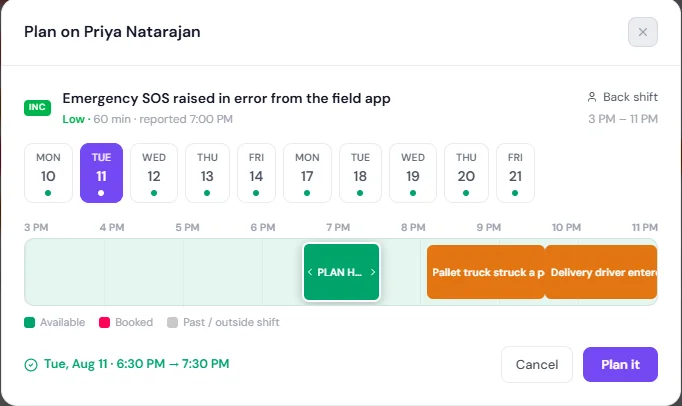
The plan dialog: a job being placed on a named staffer, with a ten-day picker and an availability strip showing available, booked and outside-shift hours
Three views

One board, three questions

Who does what, when it happens, and whether the week was possible in the first place.

Board

Columns per person, cards per job, and an Unplanned column at the left holding everything with a date and no slot. This is the view for deciding who does what.

Timeline

Lanes against a clock, with each person’s shift drawn behind their jobs. Day off, annual leave and business trip are painted on the lane, so a slot cannot be argued into a day somebody is not working.

Reports

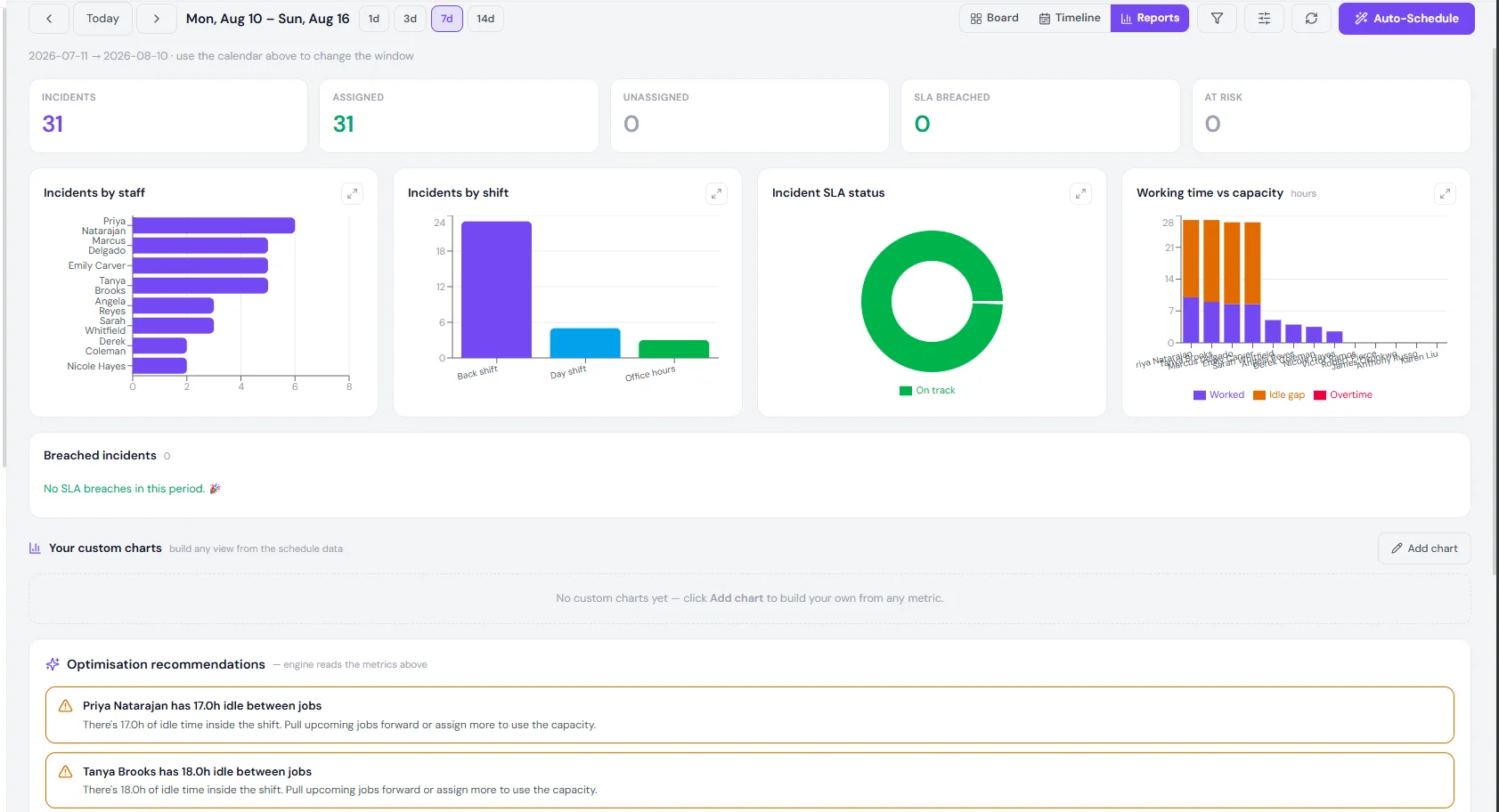
Assigned against unassigned, SLA status, and worked time against capacity — with the idle gaps named per person rather than averaged into a number nobody can act on.
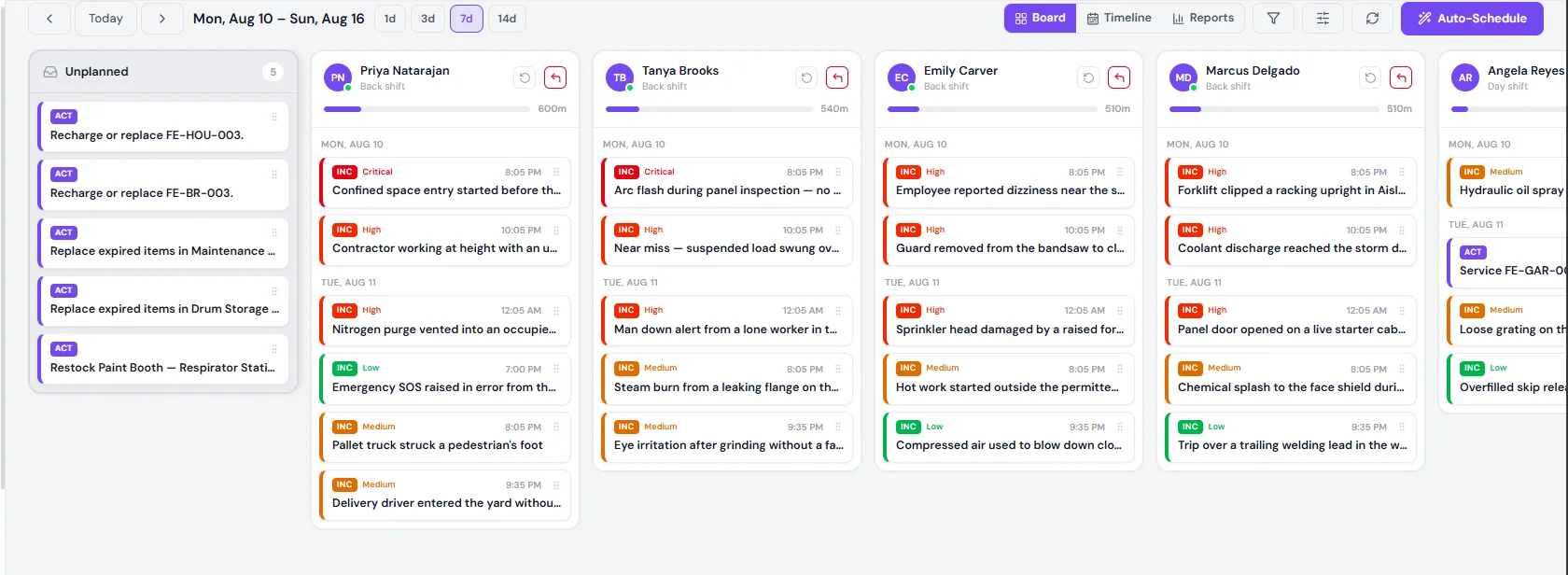
The job schedule board: an unplanned column beside per-person columns of job cards, each person with a capacity bar in minutes
Board — the unplanned column at the left, a capacity bar per person, and cards grouped by the day they are placed on.
The job schedule reports view: assigned and unassigned counts, SLA status, jobs by staff and by shift, worked time against capacity, and named idle-gap recommendations
Reports — worked time against capacity, and the idle gaps named per person rather than averaged into a number nobody can act on.

Screenshots from a working build. Illustrative records — not a customer.

The gate

Three settings, and one that is not a setting

How far the planner trusts attendance when it hands out today’s work.

The three attendance settings that govern how the planner assigns today’s work.
SettingWhat the planner does
Ignore attendancePlans against the roster only.
Skip absent and checked outdefaultRefuses today’s work to anyone with a record saying absent, or a check-out that has already happened.
Require check-inAlso refuses anyone who has not punched in — but only once their shift has started.

And one that is not a setting: approved leave always blocks

In every mode, including Ignore attendance. Leave is a decision your managers made after weighing who carries the gap; it is not a planner preference and the board does not get a vote on it.

The default refuses only on positive evidence

Skip absent and checked out means a record that says absent, or a check-out that has already happened. No record at all is a question, not a verdict — treating silence as absence would stop the board dead on any site that has shifts configured and has not finished rolling check-in out.

And a refusal says which

  • Can’t schedule — Nicole Hayes is marked absent today.
  • Can’t schedule — Emily Carver has already checked out today.
  • Can’t schedule — Derek Coleman is on approved leave that day.

Approving leave gives the work back

A request routes to the managers of the groups the requester belongs to. It is approved only when every approver agrees, rejected the moment one declines, and nobody approves their own — whatever their role.

Then the part most systems skip. Leave is requested after the week is planned, because that is the order things happen in. So on approval, the HSE work already booked inside that window is released back to Unplanned — keeping its owner, so nothing loses custody — and the planner is told how much came back. Approving time off should not quietly leave four jobs standing on an empty lane.

One worker, one day

Arrives, to recorded

Eight steps, and two of them are the ones where somebody does not turn up.
  1. 01

    Arrives

    Opens the app inside the geofence and checks in. The punch keeps a point and the site it resolved to — nothing before it, nothing after it.

  2. 02

    Measured

    Lateness against their own shift and their own grace window, not a single site-wide start time that suits nobody on back shift.

  3. 03

    Visible

    Their lane shows them on shift, and the live per-location list shows them present. That list is the roll call, kept live rather than printed at 07:00.

  4. 04

    Given work

    The planner can hand them today’s jobs, because they are here. Somebody who is not here is refused, with the reason named.

  5. 05

    Leaves

    Checks out, and minutes worked are computed from their own check-in — across midnight if that is when their shift ran.

  6. 06

    Or does not arrive

    A sweep raises Absent at shift start plus the cutoff you choose. Not at a fixed hour, and not from silence alone before the cutoff.

  7. 07

    Or is on leave

    No absence flag, no new work, and the work already booked in that window comes back to Unplanned keeping its owner.

  8. 08

    Recorded

    One row per person per day — in, out, minutes worked, lateness, the site the punch resolved to, and a note. Exportable, and in the audit trail on the site’s clock.

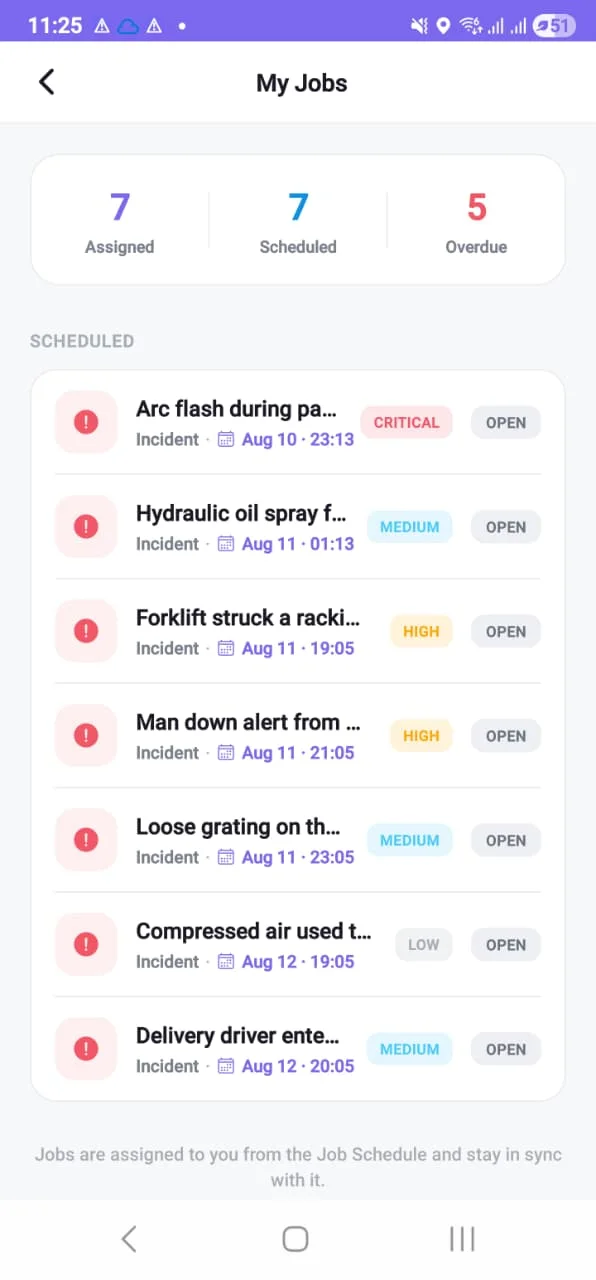
My Jobs on a phone: counts for assigned, scheduled and overdue, then the scheduled list with each job's module, date, time and severity

The same slots, on the phone that does the work

A supervisor does not open a planboard. They open their own list, and it carries what the planner placed — same jobs, same times, same order — so nobody has to translate a lane into a day.

Their own shift and their own attendance history sit beside it. That matters more than it sounds: a worker who can see their own lateness record is a worker who can dispute it, which is the difference between a measurement and a rumour.

Compliance map

What an auditor asks, and what you hand them

Clause by clause, the record this module produces — not a claim that it makes you compliant.

  • 5.4

    Consultation & participation of workers

    What the schedule hands over

    Leave requested and decided in the app the worker already carries

  • 7.2 / 7.3

    Competence & awareness

    What the schedule hands over

    Work restricted to rostered staff, permitted for the site they are standing on

  • 7.5

    Documented information

    What the schedule hands over

    One attributed record per person per day, exportable

  • 8.1.4

    Procurement & contractors

    What the schedule hands over

    Contractors clock only at the sites their own allow-list permits

  • 8.2

    Emergency preparedness & response

    What the schedule hands over

    A live, per-location list of who is checked in — the roll call, not this morning’s printout

  • 9.1

    Monitoring, measurement & analysis

    What the schedule hands over

    Lateness and absence carried as leading indicators, with their base

Sentinel supports evidencing these requirements. Certification is an audit of your organisation, not of software — no product can be bought to pass one. And this is not a payroll system: it records presence for safety, and the record exports if payroll wants it.

Objections

The eight things you are already thinking

No. It records presence for safety — who is on which site, and whether the person you just handed a job to is actually there. The record exports if payroll wants it, and plenty of sites do exactly that, but nothing here computes pay and nothing here should be bought as if it did.

A GPS point at the punch, and the site that point resolved to. Nothing between punches — there is no trail, because none is recorded. That boundary is deliberate: it is enough to know who is on which site, which is the safety question, and not enough to follow anybody around, which is not.

A 23:00–07:00 shift is one shift, and the hours after midnight are attributed to the night that started rather than the calendar day showing. Put this to every vendor you are talking to, including us, and test it the same way: ask somebody to punch in at 03:00 and see whether they can punch out.

The record stays open and shows that it is open, rather than guessing an end time. They can check back in after a mistaken check-out, but only while the shift is still running — after that it is a correction with a name against it, not a silent edit.

They clock on their own device, against the sites you have permitted them — the same per-worker allow-list everybody else uses. A contractor who is not on the list for that site cannot clock at it, which is the point.

No. The default is on and cautious — skip absent and checked out — and you can set it to ignore attendance entirely. What you cannot switch off is approved leave, which blocks in every mode, because that is a decision your managers made rather than a planner preference.

Then the board carries on. No record at all is a question, not a verdict — treating silence as absence would stop planning dead on any site that has shifts configured and has not finished rolling check-in out. The default refuses only on positive evidence: a record that says absent, or a check-out that has already happened.

Yes, including on your own infrastructure. Permissions are granular — view, create, update and delete — and every change is attributed in the audit trail on the site’s own clock.

See it on your own shift pattern.

Send us your shifts — windows, breaks, days off — and your sites. We will set them up and show you what your roll call looks like at 3 AM.

Forty-five minutes, your scenarios, no slides.