Skip to content
SentinelHSE
Approvals & e-signatures

“Approved” is a person and a timestamp. Not a status somebody set.

Sequential sign-off across six kinds of record. One named signer per step, a typed name, a comment and a stamp against that version of the file — and nobody, at any level, signs their own request.

Ask your site one question: who approved that, and how would you show me?

Most answers to that question are a name and a shrug. The permit was approved because the supervisor said go. The action was closed because the owner said it was done. The investigation was signed off in a meeting, and the meeting had minutes, and the minutes are in a folder somebody set up in 2023.

None of that is dishonest. It is just unprovable, and unprovable is the same as absent the first time somebody outside your company asks.

A spreadsheet makes it worse rather than better, because a spreadsheet has a column called Approved and anybody with the file can type in it. A status you can type is not a decision. It is a description of a decision that may or may not have happened.

The test is not whether your records say Approved. It is whether you can point at any one of them and say this person, at this time, having seen this version, agreed to this — and here is what they wrote when they did.

The thesis

Every “Approved” on this site was produced here

Four other registers on sentinelhse.io carry that badge. None of them explains it, because the explanation is this module.

  • Closed is the owner’s claim. Approved is somebody else agreeing the control is in place.

  • The control was verified on the floor, not read off a form.

  • The observation was acted on and the act was checked.

  • The root cause and the actions were both accepted by a second person.

That is 12 rows carrying the word, and this register counts 11 completed requests in its own period. The two numbers do not match, and we are not going to make them. A completed permit sign-off never prints “Approved” anywhere — it makes the permit active, which is the state that matters when the work starts. Two honest numbers beat one tidy one.

The mechanism

Nine steps, and only one of them is a signature

The rest is routing, notifying and recording — the parts that quietly fail on email and are the entire reason approvals slip.

  1. 1A record reaches the point of asking

    A permit ready to be issued, an action the owner says is done, an investigation with a root cause written. The request is raised against that record, never separately from it.

  2. 2The template decides the route

    Record type, and category if the site has split it. Nobody picks the approvers by hand, which is the difference between a workflow and an email.

  3. 3The first signer is notified

    Only the first. A three-step permit does not land in three inboxes at once and generate three half-answers.

  4. 4One person signs one step

    A decision, a typed name, an optional comment and an explicit confirmation. The step is locked to that signer — the drawer says so on the step itself.

  5. 5The stamp is written

    A fingerprint of the record as it stood, stored with the signature, so a later edit shows up as a mismatch instead of passing quietly.

  6. 6The next signer is notified

    The moment the step before completes, and not before. The request shows the count as it goes — 1 of 2, 2 of 3.

  7. 7A rejection stops it there

    The remaining steps are never reached, the record goes back to the requester with the reason attached, and the rejection stays on the file permanently.

  8. 8The record’s own state changes

    Not a badge on the approval — the record itself. The action becomes Approved, the permit becomes Active. That is the only way either of those states can be reached.

  9. 9It exports with the record

    The sign-off block is part of the record’s PDF, with the name, the date and the fact that it was signed rather than left blank.

The register

23 requests, and what each one is waiting on

Filter it. The point of a register is that a question about it takes a second rather than an afternoon.

Approval register

One working month, every state a request can reach

Illustrative data — not a customer
  • Work Permit #29
    Pending

    Cut and weld the new swarf tray bracket, weld bay 2

    Workflow
    Permit to work sign-off
    Signatures
    1 of 2
    Waiting on
    0dsince Aug 09
  • Work Permit #30
    Pending

    Break out and re-lay the yard drain run

    Workflow
    Permit to work sign-off
    Signatures
    0 of 2
    Waiting on
    0dsince Aug 09
  • Hazard #41
    Pending

    Untrained contractor working near the overhead line

    Workflow
    Hazard close-out sign-off
    Signatures
    1 of 2
    Waiting on
    0dsince Aug 08
  • Investigation #2
    Pending

    Forklift struck racking upright

    Workflow
    Investigation sign-off
    Signatures
    0 of 2
    Waiting on
    1dsince Aug 08
  • Action #30
    Pending

    Add “tower must not be moved while occupied” to the scaffold pre-use tag

    Workflow
    CAPA effectiveness sign-off
    Signatures
    1 of 2
    Waiting on
    1dsince Aug 07
  • Work Permit #31
    Rejected

    Thermographic survey of the main switchroom panels

    Workflow
    Permit to work sign-off
    Signatures
    1 of 2
    Waiting on
  • Work Permit #28
    Withdrawn

    Grind and dress the loading dock kerb repairs

    Workflow
    Permit to work sign-off
    Signatures
    0 of 2
    Waiting on
  • Hazard #17
    Withdrawn

    Sprinkler isolation valve found unlocked

    Workflow
    Hazard close-out sign-off
    Signatures
    0 of 2
    Waiting on
  • Action #42
    Approved

    Restore the two-hand control on press 4 and audit the other three presses

    Workflow
    CAPA effectiveness sign-off
    Signatures
    2 of 2
    Waiting on
  • Work Permit #22
    Approved

    Change the caustic transfer pump seal

    Workflow
    Permit to work sign-off
    Signatures
    2 of 2
    Waiting on
  • Investigation #6
    Approved

    Hydraulic oil to storm drain

    Workflow
    Investigation sign-off
    Signatures
    2 of 2
    Waiting on
  • HSE Notification #4
    Approved

    Guard rail loose on the mezzanine walkway

    Workflow
    HSE notification sign-off
    Signatures
    1 of 1
    Waiting on

Showing 12 of 12 rows — twelve of 23 requests in the period. 6 were withdrawn by the person who raised them, which is not the same thing as being refused and is counted separately here for that reason.
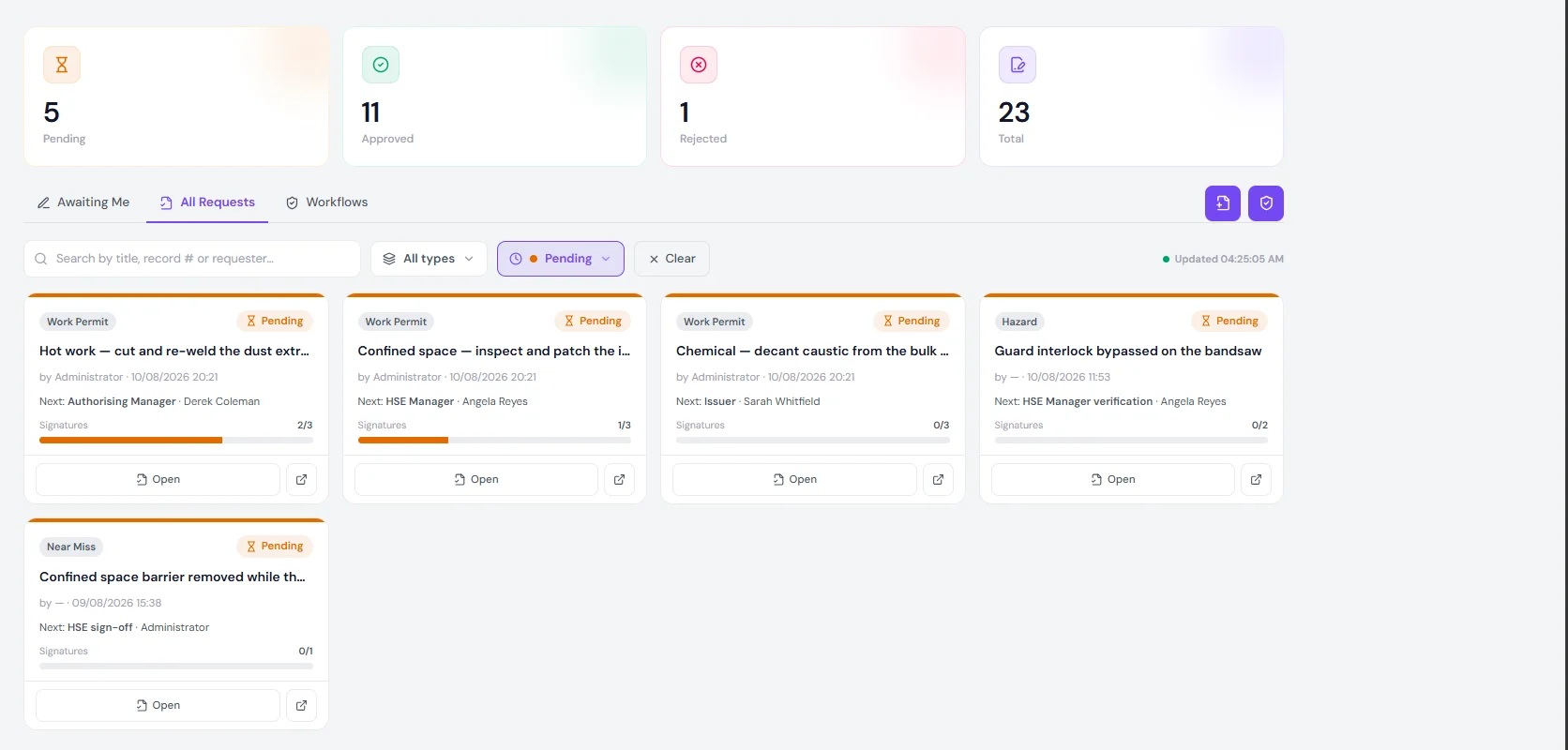
The approvals board filtered to pending requests, showing five cards with their next signer and signature count.
The same queue in the product, filtered to pending. Each card names the next signer rather than the whole chain, because the only person who can move it is the one it is sitting on. Illustrative data — not a customer.

The one number worth watching on this board is not the queue length. It is the wait: investigation #2 has been sitting on one person for 1 day. A signature that takes a week is a control that arrives after the work, and no amount of workflow design fixes a signer who is never asked to notice.

One request, open

What a signature actually holds

A decision, a typed name, a time, a comment and a stamp — on one step, by one person who cannot delegate it by forwarding an email.

Work Permit #29Pending1 of 2 signed

Cut and weld the new swarf tray bracket, weld bay 2

Requested by Derek Coleman · 09 Aug 2026

  1. HSE Manager reviewAngela Reyes

    ApprovedAngela Reyes

    Signed “Angela Reyes” · 09 Aug 2026

    Fire watch rostered for the full window and for thirty minutes after. Extinguisher and the second exit from the bay both confirmed on the walk round.

    8715b793babb39d886c525f3

  2. VP HSE authorisationSarah Whitfieldcurrent

    Awaiting signature from Sarah Whitfield

    Only Sarah Whitfield can sign this step
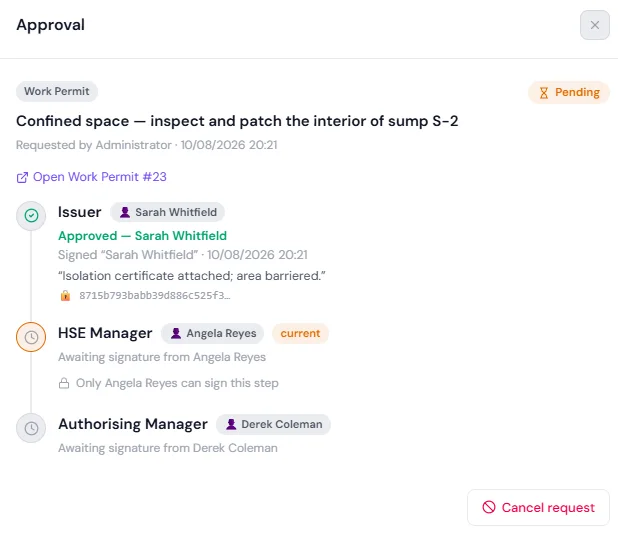
The approval drawer for a work permit, showing one signed step with its comment and stamp, one current step locked to a named signer, and one step still waiting.

The sentence that does the work

“Only Angela Reyes can sign this step.” It is on the step itself, in the product, where somebody looking at a stalled request will read it. That is the difference between a workflow and a group inbox: a group inbox is a place where everybody assumes somebody else answered.

Note what the comment on the signed step is doing. It is not a rubber stamp — it names the fire watch, the extinguisher and the second exit. Six months from now, that is the only record of what the approver actually checked.

The most valuable record in the set

A file of nothing but approvals proves nothing at all

An auditor who sees a hundred yeses and no noes has learned one thing: that the step exists. Not that it works.

Work Permit #31Rejected1 of 2 signed

Thermographic survey of the main switchroom panels

Requested by Derek Coleman · 08 Aug 2026

  1. HSE Manager reviewAngela Reyes

    RejectedAngela Reyes

    Signed “Angela Reyes” · 09 Aug 2026

    Energised work is not justified for a survey. The panels have IR windows — survey them closed, or put it in the shutdown and survey them dead. If it has to be live, resubmit with the arc-flash boundary, the approach distances and the reason live is necessary.

    5be0c8a7143d9f26b0d47c81

  2. VP HSE authorisationSarah Whitfield

    Never reached — the request was rejected before this step.

This one matters more than any approval on the page, and it is worth reading the comment in full rather than skimming it. The request was for a thermographic survey of live switchroom panels. It was refused, with three alternatives and a clear statement of what a resubmission would have to contain.

The reason it lands is on another page of this site. Investigation #5 is an arc flash during a panel inspection at this same illustrative operator. The refusal is that investigation doing its job eleven months later, through a person who read it.

The rejected request stays on the file permanently. It does not disappear when a corrected version is submitted, and the permit it was raised against went back to draft rather than quietly vanishing.

Withdrawn is not refused, and the register counts them apart

6 requests in the period were pulled by the person who raised them, before anybody signed. Collapsing those into “rejected” would flatter the approvers and slander the requesters — and it would hide the more interesting number, which is how often work is planned and then unplanned.

Work Permit #28 is the one to read: Withdrawn before work started: the dock was needed for an unplanned inbound and the fire watch could not be maintained with vehicle movements in the same bay. Nobody refused anything. The site changed, the requester noticed, and the reason is on the record instead of in somebody’s memory.

Routing

Seven templates, 14 steps, no email

A record picks up its route from its type and its category. Nobody chooses the approvers by hand, which is the difference between a workflow and a habit.

  • Action

    CAPA effectiveness sign-off

    2 steps
    1. HSE Manager verification· Angela Reyes
    2. VP HSE sign-off· Sarah Whitfield

    The catch-all default for action records. 2 requests took this route in the period.

  • Hazard

    Hazard close-out sign-off

    2 steps
    1. HSE Manager verification· Angela Reyes
    2. VP HSE sign-off· Sarah Whitfield

    The catch-all default for hazard records. 2 requests took this route in the period.

  • HSE Notification

    HSE notification sign-off

    1 step
    1. HSE Manager sign-off· Angela Reyes

    The catch-all default for hse notification records. 1 request took this route in the period.

  • Investigation

    Investigation sign-off

    2 steps
    1. HSE Manager review· Angela Reyes
    2. VP HSE sign-off· Sarah Whitfield

    The catch-all default for investigation records. 2 requests took this route in the period.

  • Risk Assessment

    Risk assessment sign-off

    2 steps
    1. Assessor· Angela Reyes
    2. HSE Manager· Sarah Whitfield

    The catch-all default for risk assessment records. No requests took this route in the period.

  • Work Permit

    Permit to work sign-off

    2 steps
    1. HSE Manager review· Angela Reyes
    2. VP HSE authorisation· Sarah Whitfield

    The catch-all default for work permit records. 5 requests took this route in the period.

  • Work Permit

    Permit to work — three-signature sign-off

    3 steps
    1. Issuer· Sarah Whitfield
    2. HSE Manager· Angela Reyes
    3. Authorising Manager· Derek Coleman

    Picked up by Hot work records only. No requests took this route in the period.

Four things the templates cannot do

Every one of these is something you will hit in week three. It is cheaper to read it now.

  • A step names a person, not a role on the record

    The template routes to Angela Reyes, not to “whoever the HSE Manager for that site is”. On one site that is the same thing. On six it is not, and the request waits on somebody who has never seen the job.

  • There is no delegate and no out-of-office

    If the named signer is on leave, the step waits. Ask what the escalation is and whether an administrator can reassign a live step — and whether that reassignment is itself on the record.

  • Sequential only

    Steps run in order, one at a time. Two approvers who could sign in parallel still queue, which is fine for two and slow for four.

  • One template deep per category

    A workflow is picked by record type and, optionally, category. There is no branching on severity — a low hazard and an extreme one take the same route unless you split them into categories.
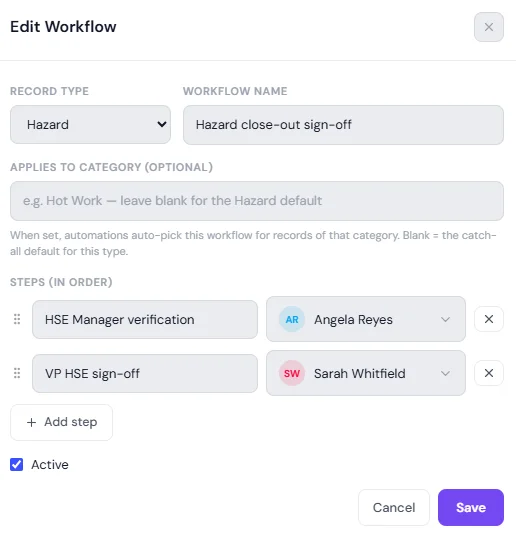
The workflow editor, showing a record type, a workflow name, an optional category and two ordered steps each with a named signer.
Steps are added, named and reordered by dragging. Leave the category blank and the template becomes the default for that record type. Illustrative data — not a customer.
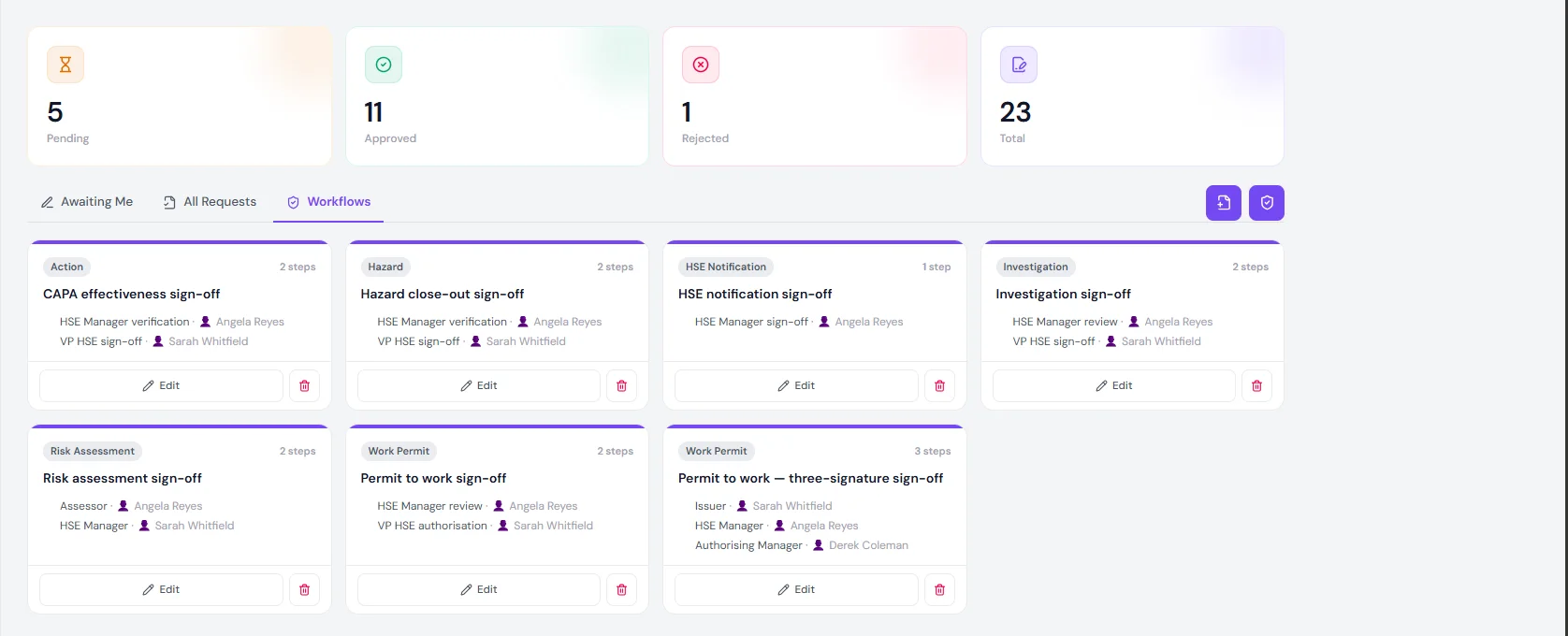
The workflows tab, showing seven configured templates across six record types with their steps and signers.
Work permits carry two: 2 steps for routine work and 3 where an area authority countersigns. Illustrative data — not a customer.
Separation of duties

Nobody approves their own request. Not even the administrator.

This is a permission, not a convention — which means it survives a busy Friday.

HSE Manager

The command centre. Assigns, investigates, approves and exports.

Approvals
Sign — never own request
Denied outright
Confidential clinical notesSelf-approval of any request

Read the grant carefully: Sign — never own request. The HSE Manager is the busiest approver on the site and still cannot sign anything they raised. Nor can an administrator sign on somebody’s behalf — a step locked to a person stays locked to that person.

What we would still ask you to check on your own configuration is the narrower version of the same problem: whether the person who wrote a record can be a named signer on it. Requesting is denied. Authoring is a template decision, and three named signers across 7 templates is a small enough pool that it is worth an hour of your time before go-live.

The sign sheet

Four fields, and one of them is doing more than it looks

Signed from the same handset the crew reports on — which on a permit usually means the approver is standing where the work is.

Sign — VP HSE authorisation

Work Permit #29: Cut and weld the new swarf tray bracket, weld bay 2

Decision

ApproveReject

Signature (type your full name)

Sarah Whitfield

Comment

Window is the day shift only. Not to be extended without a re-test.

I confirm this is my legally-binding electronic signature, applied to this record as of now.

CancelSign
A static illustration of the sign sheet, drawn from the waiting step on work permit #29 above. Illustrative data — not a customer.
  • A decision, not a button

    Approve and Reject are equally weighted and equally easy to reach. A sheet where refusing is harder than agreeing is a sheet that manufactures agreement.

  • A name typed by hand

    Typing your own name is a deliberate act in a way that clicking is not. Ask to see whether the field arrives prefilled on your build — in the captures we have it does, and that turns the signature back into a click.

  • A comment

    Optional on both decisions as configured. Make it mandatory on a rejection before you go live: a refusal with no reason tells the requester only that the answer was no, and they will guess.

  • An explicit confirmation

    The line the signer ticks is the signer’s own attestation about their signature. It is not a claim by this product that the signature binds — that question belongs to your counsel, and no checkbox settles it.

Tamper-evidence

What the stamp does, and what it does not

Written as a pair on purpose. Every row on the left is a claim we will stand behind; every row on the right is one we will not make.

  • Fingerprints the record at the moment of signing

    The stamp is computed from the record’s contents as they stood when the signature was applied, and stored beside the signature.

    It is not encryption. The record is not hidden from anybody who could already read it.

  • Makes a later edit visible

    Change the record afterwards and the stored stamp no longer matches what is on screen. The mismatch is the point — a silent edit stops being silent.

    It does not prevent the edit. Nothing in software prevents somebody with database access from rewriting a row.

  • Ties the signature to one version of one record

    A signature that could be moved to a different record is not a signature. The stamp is what stops that.

    It does not identify the human. That is your identity provider’s job, and the strength of it is the strength of your login.

  • Sits alongside the audit trail, not instead of it

    Who opened the record, who changed which field and when, is a separate log. The stamp is a check on that log rather than a replacement for it.

    It is not a legal opinion. Whether the signature binds is a question for your counsel, not for a vendor page.

The short version: this is tamper-evidence, not tamper-proofing. Anyone selling you the second word on a page like this is selling you a feeling. What you get is a record that cannot be quietly changed without the change showing.

8Approval & sign-off

Approved· 03 Aug 2026

Reported by

Anthony Russo

Signature

Date

HSE Manager sign-off

Signed

Angela Reyes

Signature

Angela Reyes

Date

03 Aug 2026

Section eight of the export for hse notification #4, printed with the block nobody signed still on it. Illustrative data — not a customer.

And it prints — including the box nobody signed

The sign-off is a numbered section of the record’s own export, not a separate certificate that could drift away from the thing it certifies. The signed block carries the name, what was typed and the date. The unsigned block carries empty rules.

That second part is the one to insist on. An export that hid the blocks nobody signed would flatter every record you own — a reader would see one signature and assume one was all it needed. Printing the empty rules is the behaviour you want when the export is what an inspector actually reads.

HSE Notification #4 was signed off on 03 Aug 2026 with the comment Corrective action verified in place.” — six words that are worth more than the badge, because they say what was checked.

The observation this signed off
Compliance map

What an auditor asks, and what you hand them

Clause by clause, the record this module produces — not a claim that it makes you compliant.

  • 8.1.3

    Management of change

    What the sign-off hands over

    The brochure names this module for this clause: an approval workflow with signatures is the change record

  • 10.2

    Incident, nonconformity & corrective action

    What the sign-off hands over

    The effectiveness sign-off is the second person agreeing a corrective action worked, not the owner marking their own homework

  • 7.5

    Documented information

    What the sign-off hands over

    Who signed, at what time, against which version — retained with the record it belongs to

  • 7.4

    Communication

    What the sign-off hands over

    The next signer is notified the moment the step before completes, and not before

  • 5.4

    Consultation & participation of workers

    What the sign-off hands over

    Workers sign for themselves — a toolbox talk, a briefing, an acceptance

  • ESIGN Act

    15 U.S.C. ch. 96 — electronic signatures in interstate commerce

    What the sign-off hands over

    The record holds the signer, the moment, what they typed and the version they signed. Whether that satisfies the Act for your use is a question for your counsel.

  • UETA

    As adopted by your state

    What the sign-off hands over

    Same record, same answer. We will show you exactly what is stored and what is not.

  • 21 CFR Part 11

    Electronic records and signatures in regulated plants

    What the sign-off hands over

    Ask us directly and early. Part 11 carries requirements this build has not been assessed against, and we would rather tell you that than tick a box on a page.

Sentinel supports evidencing these requirements. Certification is an audit of your organisation, not of software — no product can be bought to pass one. And nothing on this page is legal advice: whether an electronic signature binds is a question for your counsel, about your organisation, under the law that applies to you.

Objections

The eleven things you are already thinking

It is an electronic signature, and whether it binds is a question about your organisation rather than about this product. What the platform does is make the elements a reviewer will ask for retrievable together: who signed, which step, at what time, against which version of which record, with what they typed and what they wrote. If you are in a regulated plant working to 21 CFR Part 11, or you want to rely on ESIGN or UETA, put those requirements in front of your counsel and then in front of us — we will show you what the record holds and where the gaps are rather than tell you it is compliant.

No. Requesting and signing are separate grants, and self-approval of a request is denied outright in the permission model rather than discouraged by convention. The HSE Manager group carries “sign — never own request” for exactly this reason. What you should still check on your own configuration is the narrower case: whether the person who wrote a record can also be the named signer on its workflow, because that is a template decision rather than a permission one.

The step waits, because it is locked to that person. This is the honest weak point of the model as configured in these captures — a template routes to a name, not to “the HSE Manager on duty”. Ask to see what your administrator can do to a live step, whether reassigning one is itself recorded, and how you would handle a two-week absence. It is a real question and a page that pretended otherwise would be wasting your time.

The approval does not, but the thing it authorised usually does. A signed permit is authorised for its window and nothing beyond it — the signature does not stretch. This matters most on work that slips: the permit that was approved on Tuesday for Tuesday is not a permit on Wednesday, and the register will show it expired rather than quietly valid.

Because it is the only record that proves the control did something. A file of approvals is a file of yeses, and a reviewer cannot tell the difference between careful yeses and automatic ones. The rejection on this page — a live-panel survey sent back until somebody justified working energised — is the single most useful document in the set, and it stays on the file permanently rather than disappearing when the request is resubmitted.

Ask for it explicitly, because in the build we have seen the comment field is optional on both decisions. An approval without a comment is survivable. A rejection without one tells the requester nothing except “no”, and they will guess — usually wrong, usually twice. Every rejection on this page carries its reason, and that is how it should be configured before you go live.

No. The sign-off is on the same handset the crew reports from, which is the entire point on a permit — the person who signs is often the person standing where the work is. What we would not claim is that signing from a phone is somehow more rigorous. It is the same decision, taken closer to the job and recorded at the time rather than remembered later.

Nothing stops an edit; the stamp makes one visible. The signature stores a fingerprint of the record as it stood, so if a field changes afterwards the fingerprint no longer matches. Combined with the audit trail — who changed what, when — that is tamper-evidence rather than tamper-proofing, and we would rather describe it accurately than sell you the stronger word.

Yes, by record type and by category within it. In these captures work permits carry two templates: a two-step route for routine work and a three-signature route where an area authority countersigns. What there is no branching on is severity, so if you want an extreme hazard to take a longer route than a low one, that has to be a category rather than a score.

The editor adds steps one at a time and reorders them by dragging, and the longest configured here is three. Before you design a five-step route, count how many of those signatures would actually change a decision. A step that has never once been the reason something was refused is a delay with a name on it.

Yes — it is a numbered section of the record’s own PDF, showing who signed, the date, and whether the block was left unsigned. An unsigned block prints as an unsigned block rather than being hidden, which is the behaviour you want when the export is the thing an inspector reads.

Permissions

Who can see what — decided once, honoured everywhere

One set of rules for the whole organisation, identical on a phone in the field and a laptop in the office. Pick a group and see what it actually reaches.

Runs the crew and the day. Creates and closes work, cannot change the rules.

Reaches

  • IncidentsCreate · update · inspect
  • ActionsCreate · update · close
  • InspectionsCreate · inspect
  • Job ScheduleView own team
  • Work PermitsRequest only

Cannot reach

  • Clinic records
  • Groups & Permissions
  • Audit Trail
  • System Settings

Withheld, not merely left off a menu. What someone is not entitled to see, they cannot reach.

Always allowed, whatever the group says

  • Check themselves in
  • Sign their own toolbox talk
  • Read their own medical file

Nobody is ever locked out of their own record.

Groups, not job titles — build a group and tick the modules and actions it covers. View, create, update, delete, inspect and approve are separate grants per module. The grants shown here illustrate the model; yours are configuration.

See it on your own sign-off chain.

Tell us who signs a permit at your site, who signs off a corrective action, and who is allowed to say no. We will build those templates and walk a request from raised to signed — with a refusal in the middle, because that is the part worth watching.

Forty-five minutes, your approval chain, no slides.